LLM Proxy: A Unified AI Gateway Running on My Mac Studio
Managing multiple LLM providers gets messy fast. OpenAI for some tasks, Anthropic for others, local Ollama models for sensitive data—each with different APIs, authentication, and billing. I built LLM Proxy to solve this: a single gateway that routes requests based on sensitivity and quality requirements, tracks costs, and provides a unified API across all providers.
The Problem
Working with 10+ parallel Claude Code sessions (as I described in my LLM workflow series), I needed:
- Privacy controls: Some requests contain sensitive data that shouldn’t leave my network
- Cost optimization: Not every request needs GPT-4o—sometimes Mistral 7B is enough
- Unified API: One endpoint for all providers, with automatic model selection
- Visibility: Track costs, latency, and usage patterns across all sessions
- API key security: Every script and tool needed its own API key, increasing the risk of accidental exposure
The Solution: LLM Proxy
LLM Proxy is a Go service running on my Mac Studio that acts as an OpenAI-compatible API gateway. It routes requests to the appropriate provider based on two parameters:
- Sensitive: Can the request use cloud providers, or must it stay local?
- Precision: What quality level is needed? (low, medium, high, very_high)
// Route based on sensitive + precision flags
var routingTable = map[string]map[string]*RouteConfig{
    // sensitive: false (can use cloud)
    "false": {
        "very_high": {Provider: "anthropic", Model: "claude-sonnet-4-5-20250929"},
        "high":      {Provider: "openai", Model: "gpt-4o"},
        "medium":    {Provider: "openai", Model: "gpt-4o-mini"},
        "low":       {Provider: "ollama", Model: "mistral:7b"},
    },
    // sensitive: true (local only)
    "true": {
        "very_high": nil, // Claude requires cloud
        "high":      {Provider: "ollama", Model: "llama3.3:70b"},
        "medium":    {Provider: "ollama", Model: "gemma3:latest"},
        "low":       {Provider: "ollama", Model: "mistral:7b"},
    },
}
Why a Mac Studio?
The Mac Studio with M2 Ultra provides:
- 192GB unified memory: Enough to run large local models like Llama 3.3 70B and Qwen3-VL 235B
- Always-on: Low power consumption for 24/7 operation
- Fast inference: Apple Silicon runs Ollama models efficiently
- Local network: All homelab services can access it via
llm-proxy.lan
Architecture
The proxy exposes OpenAI-compatible endpoints:
POST /v1/chat/completions  - Standard chat completions
POST /v1/messages          - Anthropic API compatibility
POST /v1/audio/transcriptions - Speech-to-text (Whisper)
POST /v1/audio/speech      - Text-to-speech (Kokoro)
GET  /v1/models            - List available models
A typical request looks like:
curl http://llm-proxy.lan/v1/chat/completions \
  -H "Content-Type: application/json" \
  -d '{
    "model": "auto",
    "messages": [{"role": "user", "content": "Explain TCP/IP"}],
    "sensitive": false,
    "precision": "medium"
  }'
The proxy:
- Checks if
sensitive=true→ routes to local Ollama - Selects model based on
precisionlevel - Forwards to appropriate provider
- Logs request, response, latency, and cost
- Caches responses (13.4% hit rate currently)
The Dashboard
The built-in dashboard provides real-time visibility into all LLM traffic:

Key metrics at a glance:
- Total Requests: 6,239 requests across all providers
- Cache Hit Rate: 13.4% of requests served from cache
- Total Cost: $76.70 lifetime, $0.0014 today
- Provider Breakdown: Requests split across OpenAI, Anthropic, and Ollama
Each request shows the provider, model, usecase tag, latency, and cost. Clicking a row reveals the full request/response for debugging.
Analytics Deep Dive
The analytics page breaks down usage patterns:
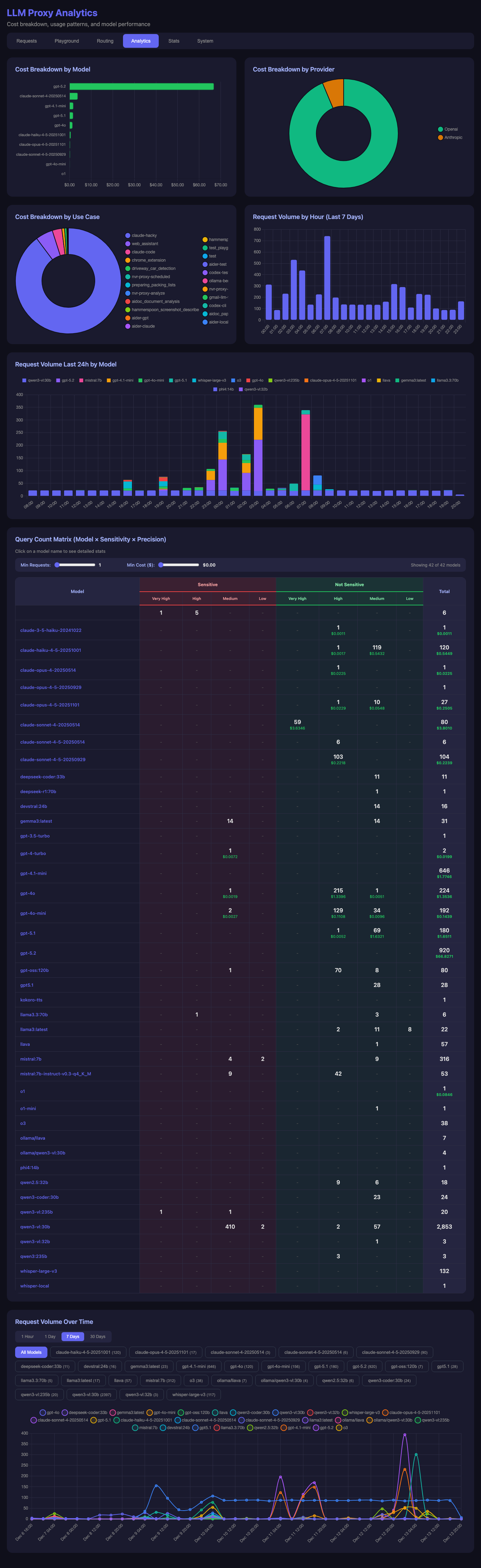
Insights from the data:
- Cost by Provider: OpenAI dominates costs (the pie chart tells the story)
- Request Volume: Peaks during active development hours
- Model Distribution:
qwen3-vl:30bhandles the bulk of local vision requests - Sensitivity Matrix: Most requests are non-sensitive, using cloud providers
Performance Metrics
The stats page tracks latency across all models:
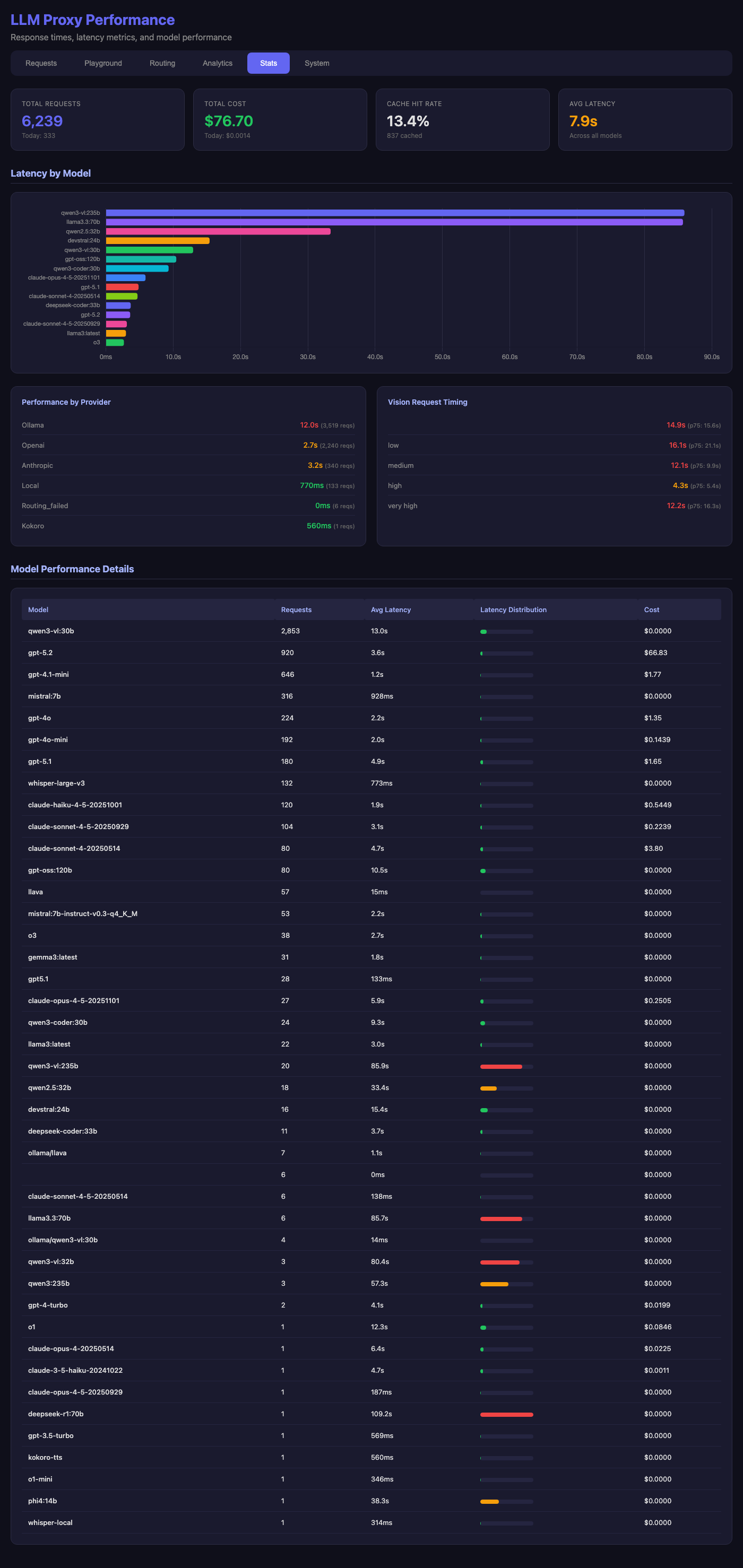
Notable patterns:
- Local models (Ollama): 12s average for large models like Llama 3.3 70B
- Cloud providers: 2-3s average for OpenAI and Anthropic
- Vision requests: 15s average at p75 for “very_high” precision
- Fastest: Local small models like Mistral 7B at under 1s
The model performance table shows cost efficiency—Ollama models cost $0.00 while providing reasonable quality for many tasks.
Test Playground
The playground lets me test routing logic without writing code:
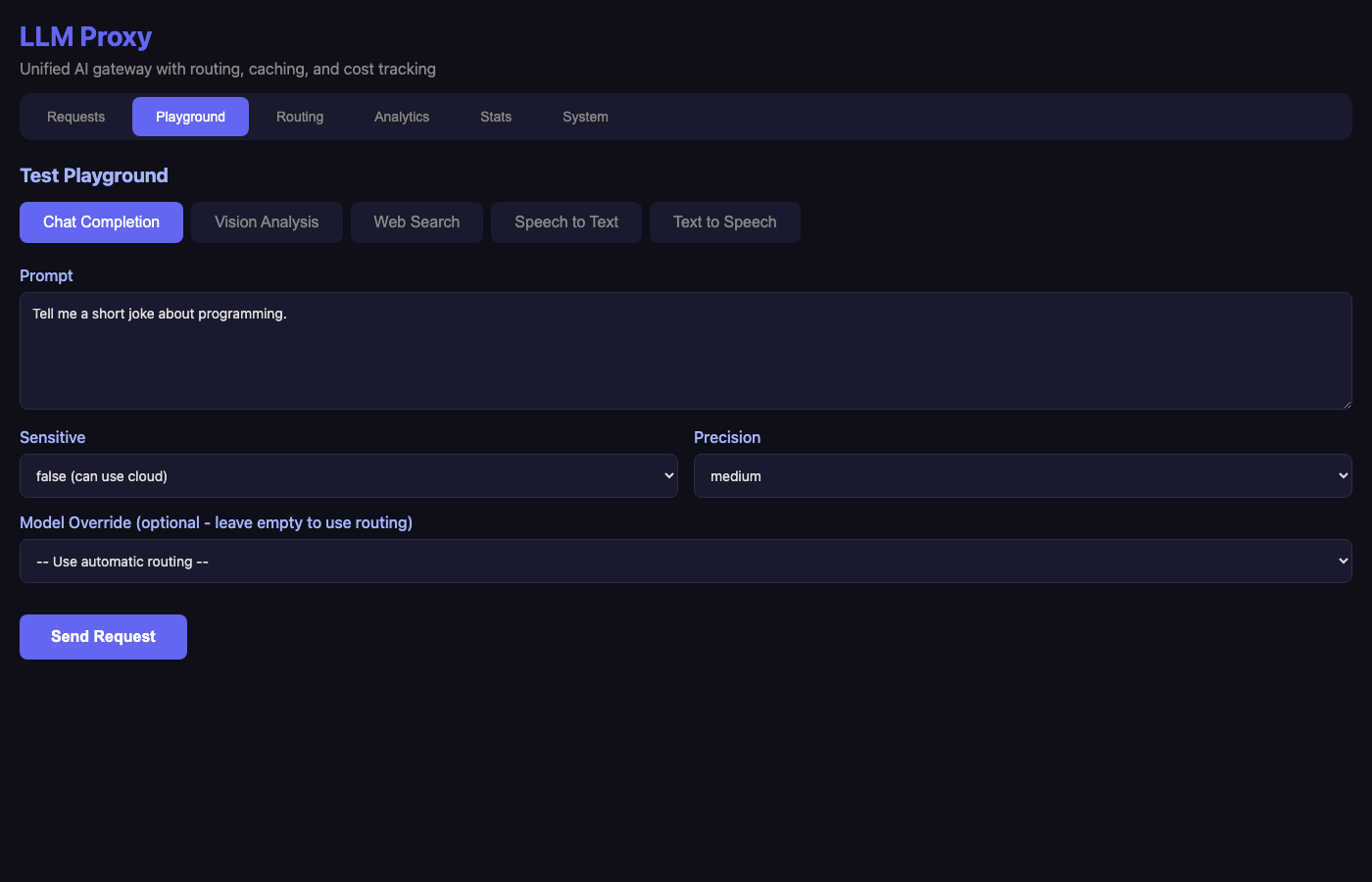
Features:
- Multiple modes: Chat, Vision, Web Search, Speech-to-Text, Text-to-Speech
- Routing controls: Toggle sensitive flag, select precision level
- Model override: Force a specific model when needed
Key Features
1. Vision Model Auto-Detection
The proxy detects vision-capable models from Ollama automatically:
func getOllamaVisionModels() []string {
    // Check model family for vision indicators
    family := strings.ToLower(details.Details.Family)
    if strings.Contains(family, "vl") ||
       strings.Contains(family, "llava") ||
       strings.Contains(family, "vision") {
        isVision = true
    }
}
When a request includes images, it routes to vision-capable models only.
2. Cost Tracking
Every request calculates cost based on model pricing:
var modelPricing = map[string][2]float64{
    // OpenAI
    "gpt-4o":      {2.50, 10.00},  // $2.50/1M input, $10/1M output
    "gpt-4o-mini": {0.15, 0.60},
    // Anthropic
    "claude-sonnet-4-5-20250929": {3.00, 15.00},
    // Ollama (free)
    "llama3.3:70b": {0, 0},
}
3. Response Caching
Identical requests return cached responses, reducing costs and latency:
func generateCacheKey(req ChatCompletionRequest) string {
    h := sha256.New()
    h.Write([]byte(req.Model))
    for _, m := range req.Messages {
        h.Write([]byte(m.Role + m.Content))
    }
    return hex.EncodeToString(h.Sum(nil))
}
4. Request Replay
Debug issues by replaying any historical request with different parameters—useful for testing model changes.
5. Usecase Tagging
Clients can tag requests with a usecase (e.g., mnr-proxy-scheduled, claude-cindy) for per-project analytics.
Deployment
The proxy runs as a systemd service on the Mac Studio:
# Build and deploy
make deploy  # Builds binary, SCPs to studio.lan, restarts service
It integrates with my homelab’s Caddy reverse proxy for HTTPS:
https://llm-proxy.lan {
    reverse_proxy studio.lan:8880
}
What’s Next
Future improvements I’m considering:
- Rate limiting: Prevent runaway costs from automated scripts
- Budget alerts: Notify when daily/weekly spend exceeds thresholds
- A/B testing: Route percentage of traffic to evaluate new models
- Streaming metrics: Track time-to-first-token for streaming responses
Conclusion
LLM Proxy transformed how I work with AI. Instead of managing API keys and provider differences across every project, I point everything at http://llm-proxy.lan and let the routing logic handle the rest.
The security benefit is significant: API keys for OpenAI, Anthropic, and other providers live in exactly one place—the proxy’s environment. Individual scripts, tools, and Claude Code sessions never see the actual keys. This dramatically reduces the risk of accidentally committing a key to git, exposing it in logs, or leaking it through environment variable dumps. One secured location beats dozens of scattered .env files.
The visibility into costs and performance has already paid for itself—I discovered several scripts making unnecessary high-precision requests that I downgraded to save money.
The combination of Apple Silicon’s memory capacity and Ollama’s efficiency makes local inference practical for sensitive data. And having everything logged means I can always debug issues or analyze patterns after the fact.
The full source code is available on GitHub. If you’re juggling multiple LLM providers, consider building something similar—the unified API alone is worth it.